This article will outline how to deactivate an administrator in the Powered By Jumbo Admin platform.
Prerequisites
- Access to Jumbo Lottery Platform (JLP) Admin
- Relevant role capabilities needed to edit an administrator.
1. Search For The Administrator
To view a list of operators using JLP Admin, select Operations from the top menubar.
This will show a complete listing of active and inactive users currently in JLP Admin.
Filters are located at the top of the table to enable efficient searching. You also have the option to search for an existing Administrator by using any of the following search fields:
- Name
- Username
- Last Login
- Role
- Organisation
- Status
- Internal
- Two-Factor Authentication status
2. Select The Administrator
From the list of existing administrators, select the correct user you would like to deactivate.
Once you have located the correct administrator, click the administrator’s name to edit their access.
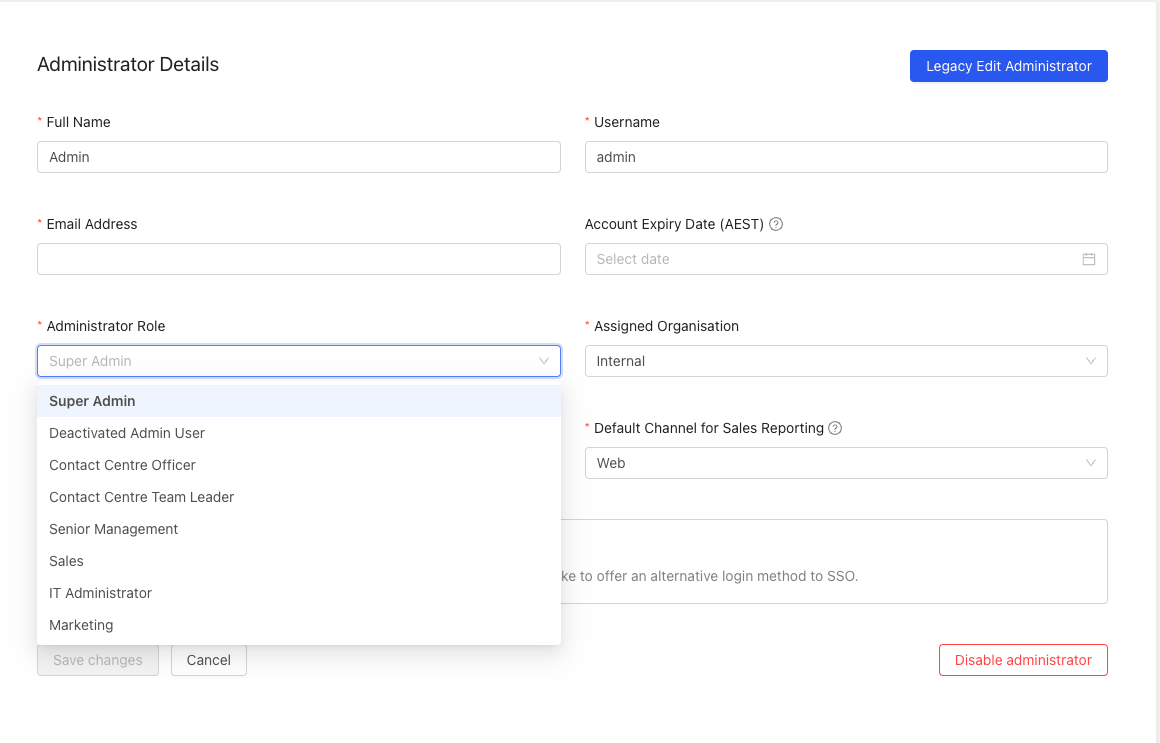
Change the role to Deactivated Admin User.
Make the changes required and click the blue Save changes button to complete the edit.
3. View admin history events
You can easily view changes by accessing the Admin history events from the top right corner.